Winter Hours
NMSU IT Help Desk and Computer Labs will follow adjusted hours from December 13 - January 16. This includes Winter Hours and designated closure dates.
Winter Hours |
|
|---|---|
| Monday | 8:00 am - 5:00 pm |
| Tuesday | 8:00 am - 5:00 pm |
| Wednesday | 8:00 am - 5:00 pm |
| Thursday | 8:00 am - 5:00 pm |
| Friday | 8:00 am - 5:00 pm |
These hours apply to:
- December 15-19
- December 23
- January 5-9
- January 12-16
Closed:
- December 13-14
- December 20-21
- December 24 - January 2 (Winter Holiday Break)
- January 3-4
- January 10-11
- Weekend hours (10:00am - 5:00pm) resume January 17.
- Full weekday schedule (8:00am - 8:00pm) resumes January 19.
Computer Labs
IT computer labs are public study spaces equipped with computers and printers to assist with your schooling needs.
Reserve IT Computer Lab Room 206
Location:
Hardman & Jacobs Undergraduate Learning Center
| Monday - Thursday | 08:00 AM – 12:00 AM |
|---|---|
| Friday | 08:00 AM – 10:00 PM |
| Saturday | 10:00 AM – 10:00 PM |
| Sunday | 10:00 AM - 12:00 AM |
| PC Software |
| 7-Zip |
| Adobe After Effects 2024 |
| Adobe Animate 2024 |
| Adobe Audition 2024 |
| Adobe Bridge 2024 |
| Adobe Character Animator 2024 |
| Adobe Dimension |
| Adobe Dreamweaver 2021 |
| Adobe Illustrator 2024 |
| Adobe InCopy 2024 |
| Adobe InDesign 2024 |
| Adobe Lightroom Classic |
| Adobe Media Encoder 2024 |
| Adobe Photoshop 2024 |
| Adobe Prelude 2022 |
| Adobe Premiere Pro 2024 |
| Adobe Premiere Rush |
| Adobe XD |
| Alertus |
| Anaconda Python |
| Google Chrome |
| IBM SPSS |
| LabStats |
| Microsoft 365 Apps |
| Mozilla Firefox |
| Putty |
| R |
| RStudio |
| Remote Help |
| Respondus Lockdown Browser Lab |
| SAS* |
| Tableau Desktop |
| Tableau Prep 2023.2 |
| Visual Studio Code |
| VLC |
| WEPA Desktop Client |
| WinSCP |
| Zoom |
| *SAS available on the following computer stations: |
| 1, 3, 5, 7, 9 |
| 15, 17-19 |
| 21, 24, 26, 29 |
| 30-36 |
| 43, 46-49 |
- (24) Windows 10 Workstations
- (2) WEPA Print Stations
- (1) Scanner
Location:
Corbett Center Student Union, 2nd floor
| Monday - Thursday | 08:00 AM – 12:00 AM |
|---|---|
| Friday | 08:00 AM – 10:00 PM |
| Saturday | 10:00 AM – 10:00 PM |
| Sunday | 10:00 AM - 12:00 AM |
| PC Software |
| 7-Zip |
| Adobe After Effects 2024 |
| Adobe Animate 2024 |
| Adobe Audition 2024 |
| Adobe Bridge 2024 |
| Adobe Character Animator 2024 |
| Adobe Dimension |
| Adobe Dreamweaver 2021 |
| Adobe Illustrator 2024 |
| Adobe InCopy 2024 |
| Adobe InDesign 2024 |
| Adobe Lightroom Classic |
| Adobe Media Encoder 2024 |
| Adobe Photoshop 2024 |
| Adobe Prelude 2022 |
| Adobe Premiere Pro 2024 |
| Adobe Premiere Rush |
| Adobe XD |
| Alertus |
| Anaconda Python |
| Google Chrome |
| IBM SPSS |
| LabStats |
| Microsoft 365 Apps |
| Mozilla Firefox |
| Putty |
| R |
| RStudio |
| Remote Help |
| Respondus Lockdown Browser Lab |
| Tableau Desktop |
| Tableau Prep 2023.2 |
| Visual Studio Code |
| VLC |
| WEPA Desktop Client |
| WinSCP |
| Zoom |
- (22) Windows 11 Workstations
- (1) WEPA Print Stations
General-Use Stations
Informations Technology's general-use stations are small computer clusters in areas across the main campus. Similar to our computer labs, they are available for use by the entire NMSU community.
Location:
Breland Hall, Lobby
Availability depends on building hours.
| PC Software |
| 7-Zip File Manager |
| Adobe Acrobat Distiller DC |
| Adobe Creative Cloud |
| Audacity |
| Google Chrome |
| Google Earth |
| GRE |
| IBM SPSS Statistics 24.0 |
| LockDown Browser |
| MATLAB |
| Microsoft Mathematics |
| Microsoft Office 365 |
| Microsoft Visio |
| Microsoft Visual Studio Code |
| Mozilla Firefox |
| NAPS2 (Not Another PDF Scanner 2) |
| OpenBoard |
| PuTTY |
| Python |
| Skype |
| VLC Media Player |
| WinSCP |
| Zoom |
- (2) Windows 11 Workstations
Location:
Health & Social Services Building
For hours, visit dining.nmsu.edu.
| PC Software |
| 7-Zip File Manager |
| Adobe Acrobat Distiller DC |
| Adobe Creative Cloud |
| Audacity |
| Google Chrome |
| Google Earth |
| GRE |
| IBM SPSS Statistics 24.0 |
| LockDown Browser |
| Microsoft Mathematics |
| Microsoft Office 365 |
| Microsoft Visual Studio Code |
| Mozilla Firefox |
| NAPS2 (Not Another PDF Scanner 2) |
| OpenBoard |
| PuTTY |
| Python |
| Skype |
| VLC Media Player |
| WinSCP |
| Zoom |
- (1) Windows 11 Workstation
Location:
Frenger Food Court
For hours, visit dining.nmsu.edu.
| PC Software |
| 7-Zip File Manager |
| Adobe Acrobat Distiller DC |
| Adobe Creative Cloud |
| Audacity |
| Google Chrome |
| Google Earth |
| GRE |
| IBM SPSS Statistics 24.0 |
| LockDown Browser |
| Microsoft Mathematics |
| Microsoft Office 365 |
| Microsoft Visio |
| Microsoft Visual Studio Code |
| Mozilla Firefox |
| NAPS2 (Not Another PDF Scanner 2) |
| OpenBoard |
| PuTTY |
| Python |
| Skype |
| VLC Media Player |
| WinSCP |
| Zoom |
- (1) Windows 11 Workstation
Location:
Gerald Thomas Hall, Room 157
For hours, visit dining.nmsu.edu.
| PC Software |
| 7-Zip File Manager |
| Adobe Acrobat Distiller DC |
| Adobe Creative Cloud |
| Audacity |
| Google Chrome |
| Google Earth |
| GRE |
| IBM SPSS Statistics 24.0 |
| LockDown Browser |
| MATLAB |
| Microsoft Mathematics |
| Microsoft Office 365 |
| Microsoft Visio |
| Microsoft Visual Studio Code |
| Mozilla Firefox |
| NAPS2 (Not Another PDF Scanner 2) |
| OpenBoard |
| PuTTY |
| Python |
| Skype |
| VLC Media Player |
| WinSCP |
| Zoom |
- (1) Windows 11 Workstation
Remote Access to NMSU Data/Systems
If you’re working from home and need to access files or systems that require a connection to NMSU’s network:
For access to NMSU data or systems, you’ll need to use NMSU’s Virtual Private Network (VPN). VPN allows you to create a secure network path from your home computer across the internet to NMSU’s data and systems. Once you download and login with the VPN software, you simply open your browser for access to the data and systems. VPN is available for download at: vpn.nmsu.edu.
For help installing VPN on Windows, see Install Cisco VPN (Windows). For help with Installation on Mac, see Install Cisco VPN (Mac).
Omnissa Horizon allows users to access on-campus desktops/software from off-campus. For more information on accessing NMSU's virtual lab, see Article - Virtual Lab Access: Off Campus.
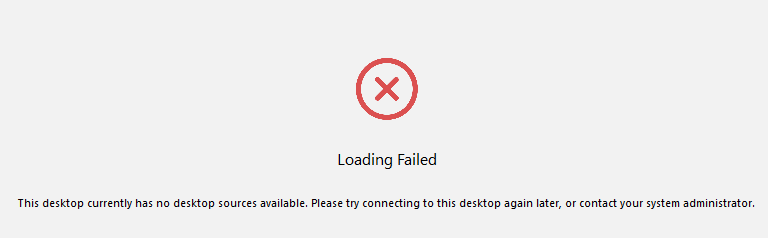
Note: Up to 100 lab virtual machines can run concurrently. If you receive the following error message, it means they are all in use, and you'll have to try again later.